Free on iPhone · by LevoZ Labs
Lift with your crew
A workout log for you and your gym friends. Hit your weekly goal together, keep the streak alive, and climb the ranks.
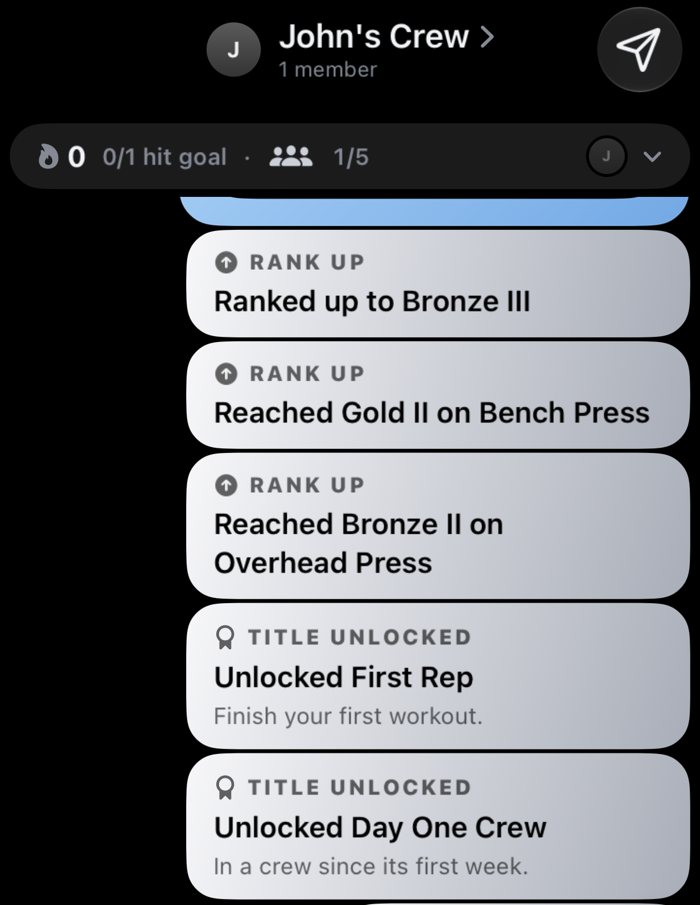
Crews
- Start a crew or join one with a code.
- One group chat. Your workouts, PRs and rank-ups post on their own.
- Set a weekly goal. Hit it together to keep the crew streak alive.
- See who's lifting right now and tap Join to do the same workout.
- Message anyone in your crew 1-on-1.
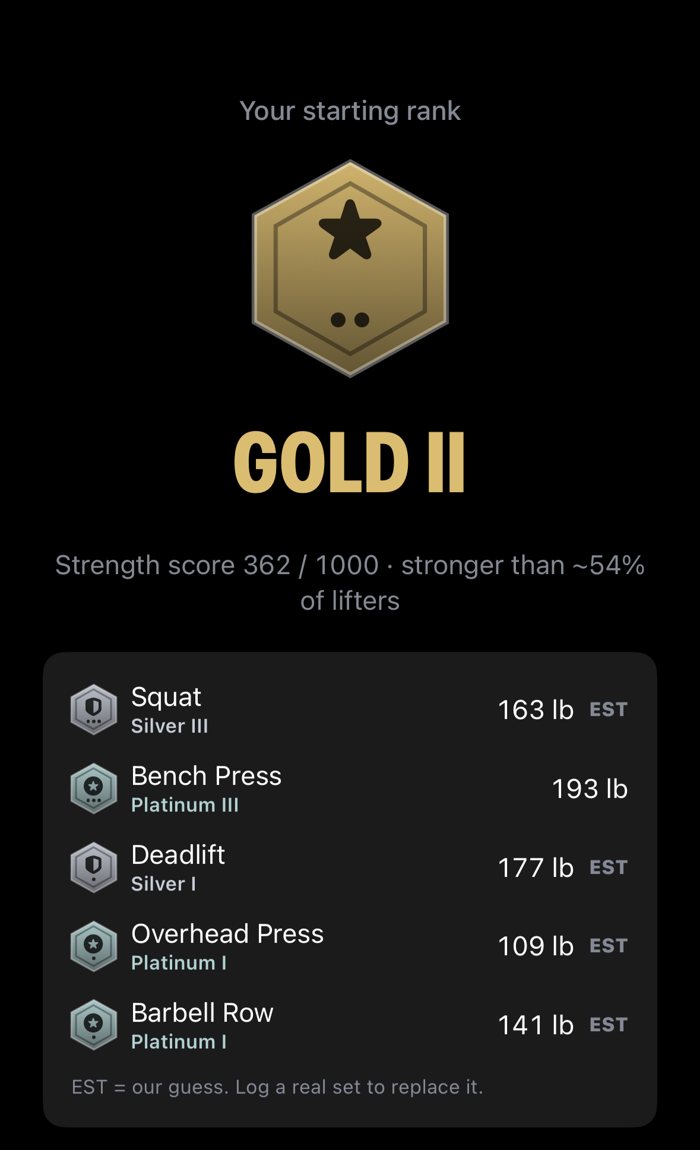
Ranks
- Get a rank on squat, bench, deadlift, overhead press and barbell row.
- Climb from Bronze up as you get stronger.
- Compare your lifts with your crew.
Cards, challenges & drops
- Every workout becomes a card: exercises, top sets, time and volume.
- Add a gym selfie, stickers, a caption and a song.
- Anyone in your crew can tap “Do this workout” to run it themselves.
- Start a crew challenge or call out one friend in a 1v1.
- Hit your weekly goal to open a drop: chat colors, bubble borders, badges and reactions.
Logging
- Build your split, grab a quick workout, or find one.
- Last time's numbers show next to every set.
- Rest timer, plate calculator and personal records.
How it works
Bring your gym friends
Download on the App StoreSupport
Something not working, a question, or a person to report? Email us and a real person will answer.
How do I delete my account?
In the app: Settings → Delete account. It removes your account and your data from our servers and your phone.
How do I report or block someone?
Press and hold their message or post, then tap Report or Block. We review reports within 24 hours. Blocked people aren't told. See them in Settings → Blocked people.
I got a new phone. How do I get my workouts back?
On your old phone, turn on Settings → Backup. On the new phone, tap Restore from a backup on the welcome screen.
How do I change notifications?
Settings → Notifications. You can turn chat, crew activity, nudges and streak alerts on or off.
Something's broken
Use Settings → Report a problem, or email us with what you tapped and what happened. A screenshot helps.
Privacy Policy
Last updated October 26, 2026
Short version: your workout log stays on your phone, your crew sees what you share with your crew, and we never sell your data or show ads.
Read the full privacy policy
This explains what ArcLift collects, where it goes, and what you can do about it.
Stays on your phone
- Your workouts, sets, routines, splits and exercise history.
- Your profile and quiz answers: bodyweight, goals, training days, age range, sleep, areas to be careful with, and so on.
- Your daily basics check-offs (protein, water, sleep, supplements) and reminder time.
- Photos or text you use to import a plan. Text is read on your phone and the photo is never uploaded.
Sent to our servers
- An anonymous account ID, created automatically. We don't ask for your email, phone number or password.
- If you link your Apple ID (Settings → Backup): a private ID from Apple tied to your account. We don't ask for or see your email.
- A backup of what's on your phone (workouts, routines, profile, daily basics), so you can restore it. Only you can read it. Health data is never included.
- A notification token for your phone and your notification settings, so we can send crew notifications.
- Feedback survey answers, if you send them, with simple context (days using the app, number of workouts, crew size).
- Your display name.
- What your crew sees: your strength score, workouts this week and last week, your week streak, when you last trained, and any excuse you post.
- What you post in the crew: chat messages, reactions, workout cards (sets, volume, time and your top set per exercise, plus any caption and stickers you add), PRs, rank-ups, check-ins, challenges and nudges.
- "Lifting now" posts when you start a workout, with the workout's name and exercises. They're removed when you finish.
- Direct messages you send to someone in your crew, including workout cards. Only the two of you can read them.
- Photos you choose to post: gym check-ins, chat photos and workout card covers. Only your crew can see them. They're shrunk before upload and deleted automatically after about 60 days.
- Songs you add to a workout card: the song's name, artist, artwork link and its Apple Music preview link. ArcLift never stores the music itself.
- Routines you choose to share on Discover, with your name.
- If you turn on the global leaderboard: your first name, crew name, week streak, strength score and workouts this week. It's off unless you turn it on.
- Reports you send: the reported message or post, who posted it, and the reason.
Apple Health and Apple Watch
- Off until you turn it on.
- If you do, ArcLift saves finished workouts to Apple Health and reads heart rate and calories to show on your workout summary.
- Health data stays on your phone and watch. It is never sent to our servers, never used for advertising and never sold.
- The watch app talks only to your phone.
Who we share it with
- Your crew sees your crew data and posts. The person you message sees your direct messages. Other ArcLift users can see Discover routines and, if you opt in, your leaderboard row.
- We use Google Firebase (Authentication, Cloud Firestore, Cloud Storage, Cloud Functions and Cloud Messaging) to run the app and send notifications. Notifications travel through Apple's push service. Google stores this data for us and isn't allowed to use it for anything else.
- We don't sell your data, we don't show ads, and we don't use ad tracking.
- We may share information if the law requires it, or to protect someone's safety.
How long we keep it
- As long as your account exists. When you delete your account we delete your server data: crew membership, messages, direct messages, posts, challenges you started, shared routines, your leaderboard row, your photos and your backup.
- Reports may be kept for up to 90 days so we can deal with repeat abuse.
Your choices
- Delete any of your own messages or posts (press and hold).
- Leave a crew, block people, and turn the global leaderboard or Apple Health off.
- Delete your account in Settings → Delete account. That deletes your data from our servers and this phone.
- Depending on where you live, you may have more rights (like getting a copy of your data). Email us and we'll help.
Kids
- ArcLift is not for children under 13. If we learn someone under 13 has an account, we'll delete it.
Security
- Access to server data is locked down so only the right people can read it (for example, only your crew can read your crew's chat). No system is perfect, so don't post anything you'd want kept secret.
Changes
- If we change this policy in a big way, we'll tell you in the app.
Contact
- Questions or requests: [email protected]